Deep analysis per symbol per day
One write-up per symbol per day. Chart, data, and narrative linked to that day's playbook trades. Turn numbers into lessons.
What is a trade write-up?
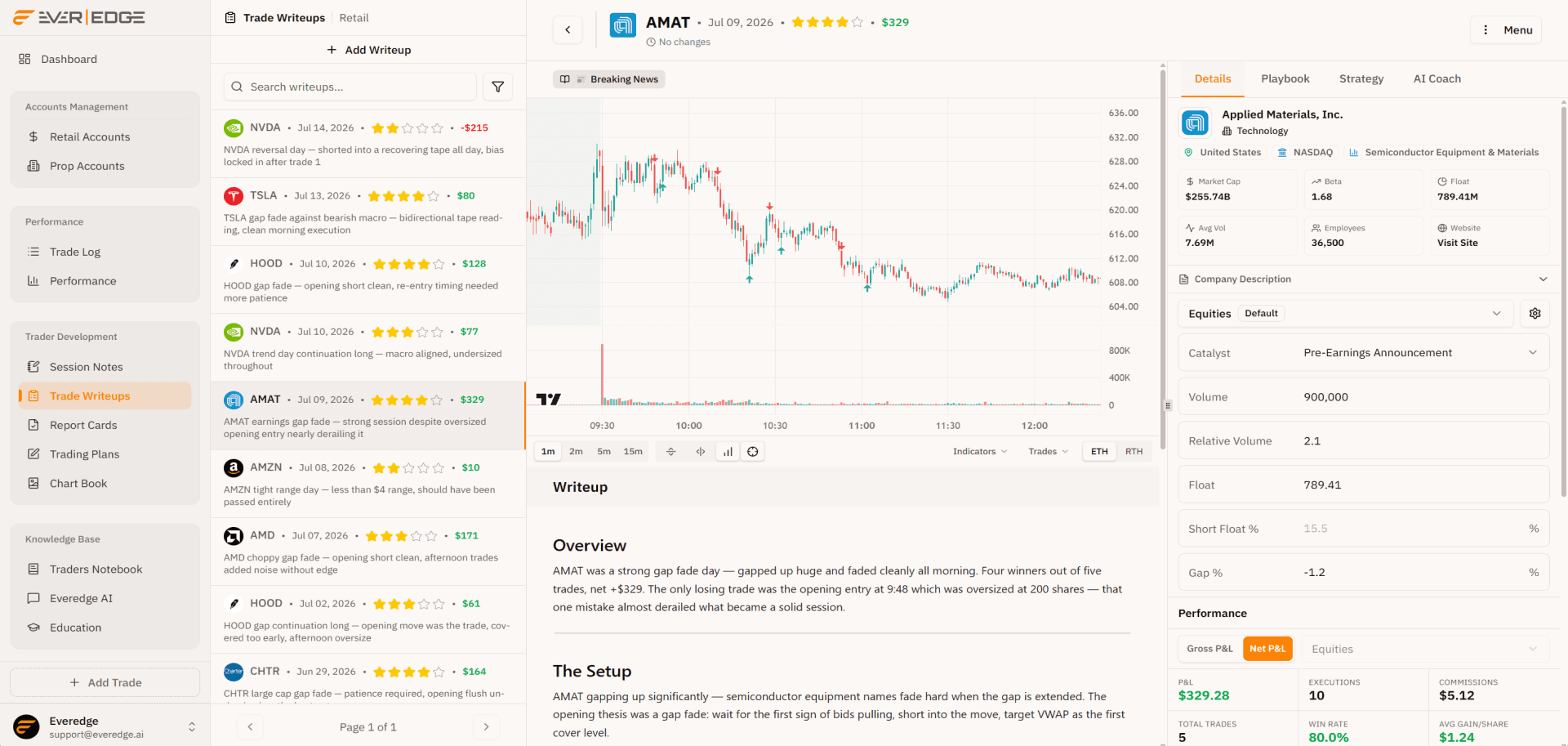
A trade write-up is a deep analysis document for a specific symbol on a specific day, combining chart annotations, trade data, and narrative review.
Write-ups group trades by playbook. They turn a session from a P&L number into a lesson you can reference later.
Chart + data
Executions plotted on price action
The TradingView chart loads for the session automatically. Entry and exit markers sit on the candles. Hover any execution for qty, price, and P&L without leaving the write-up.
Numbers tell you what happened. The chart shows where it happened.
Session sidebar
Chart, data, and context in one panel
Structured inputs on every write-up. Click any execution on the chart and the tagged playbook, strategy, and risk rules load in the sidebar.

NVDA
• Jul 10, 2026$77NVDA trend day continuation long, macro aligned, undersized throughout

AMAT
• Jul 09, 2026$329AMAT earnings gap fade, strong session despite oversized opening entry nearly derailing it

AMZN
• Jul 08, 2026$10AMZN tight range day, less than $4 range, should have been passed entirely
AMD
• Jul 07, 2026$171AMD choppy gap fade, opening short clean, afternoon trades added noise without edge
Write-up feed
Jump between symbol-day write-ups in your journal. Star ratings, P&L, and one-line summaries keep recent sessions scannable.
Applied Materials, Inc.
Technology
Market Cap
$255.74B
Beta
1.68
Float
789.41M
Avg Vol
7.69M
Employees
36,500
Website
Visit Site
Symbol details
Company profile, sector, exchange, and key stats load for the session ticker. Context without leaving the write-up.
P&L
$329.28
Executions
10
Commissions
$5.00
Total Trades
5
Win Rate
80.0%
Avg Gain/Share
$1.24
Cumulative P&L
Trades by Duration
Performance stats
Net P&L, win rate, commissions, cumulative equity curve, and trades-by-duration scatter for this symbol-day session.
7/8
88%
- News confirmed by at least two credible sources
- News is material, directly impacts the company, sector, or macro environment
- News is unscheduled, not a pre-announced event
- Volume spiked sharply on the news, well above average
- Initial spike was directional, no immediate whip or reversal
- Bid/ask spread tightened after the initial spike, liquidity returned
- A consolidation formed after the spike with a clear trigger level
- Correlated instruments confirmed the move, no divergence
Playbook criteria
Select an execution on the chart and the tagged playbook loads with its checklist. See which criteria you hit on that entry.
4/6
67%
- Calculate 14-period ATR from the daily chart before the session
- Both 1x and 2x ATR target levels calculated and noted before entry
- Setup is A or A+ quality, strong enough conviction to hold for the larger target
- Exit partial (half or a third) at the 1x ATR level to lock in a guaranteed win
- Move stop to breakeven on the remainder after 1x ATR is hit
- Exit remainder at the 2x ATR level, do not hold beyond it chasing a larger move
Trade risk management
Rules followed
Max Trade Risk
Trade loss of $0.00 within limit of $80
Execution strategy
The strategy tagged to that execution opens with its rules and trade-level risk check. Know exactly what you planned vs what you did.
Session fields
Fill in catalyst, volume, float, gap, and any other inputs on your Equities form. Structured data stored on the write-up, ready for AI.
Create custom fields and organize them into form groups. Drag and drop fields to add or remove them from form groups.
Available 9 inputs
Active 6 inputs
Customize forms
Create custom inputs and organize them into groups. Available fields on the left, active fields on the right. Tailor each group to how you actually trade.
How can I help?
Ask about custom fields, playbook criteria, or which patterns are working in your report card period.
Message your AI coach...
AI Coach
Ask which custom inputs, catalysts, or setups correlate with your best sessions. The coach reads your structured data, not just P&L.
The chart shows where. The sidebar shows why.
The writing surface
Write the analysis
Overview, setup notes, and callouts in the same Notion-style editor used across Everedge. Tables, embedded charts, and links to playbooks and chart books.
The same premium editor behind your plans and playbooks, tuned for per-symbol daily review.
Select to format, or hand it to AI
Tighten your analysis, fix grammar, or expand a section without leaving your write-up.
The gap and go works best when volume confirms the break above premarket highs.
Every write-up connects
Link playbooks, chart books, and trading plans. Your analysis stays tied to the setup and the session.
📓 TSLA Write-up
8 linked docs
Embed any document
Slash-insert a live link to a playbook, chart book, or strategy right inside your write-up.
Connect AI to your write-ups
Use MCP to draft and update write-ups from Claude or Cursor, without leaving your workflow.


A write-up you actually want to reference later.
Write better trade write-ups
Turn every session into structured analysis linked to your playbooks.